CalcBoard / Programmer Calculator
Hex, Binary, Octal & Decimal — All Four Bases at Once
CalcBoard's programmer mode shows every value in BIN, OCT, DEC, and HEX simultaneously — no cycling through bases — with the bitwise operators you actually use.
Download CalcBoard FreeThe display is the feature
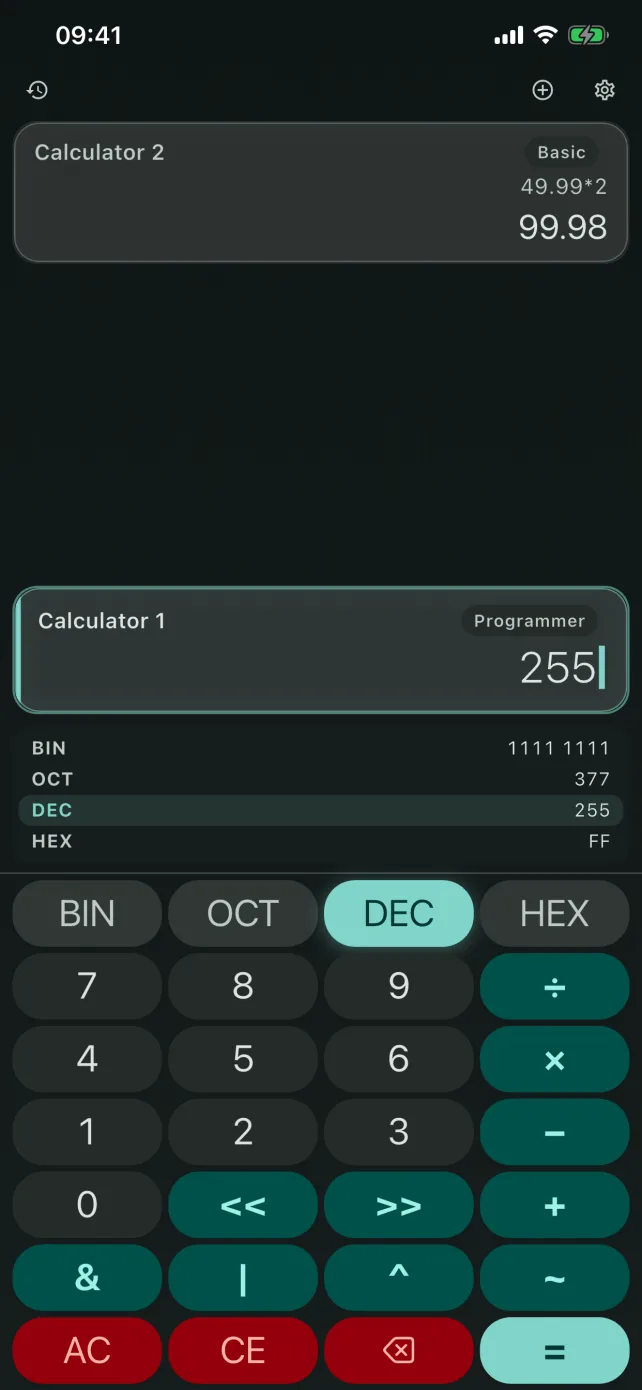
Most programmer calculators make you toggle between bases and hold the other representations in your head. CalcBoard renders all four bases at the same time: type 255 and see 1111 1111, 377, 255, and FF stacked on the display, binary nibble-grouped for readability. Tap any row to switch your input base to it.
Bitwise, the full set
- Logic: AND, OR, XOR, NOT — each key VoiceOver-labeled by name, not symbol.
- Shifts: left shift (<<) and right shift (>>).
- Integer arithmetic: +, −, ×, and truncating division, with parentheses.
- Hex input: A–F keys on the keypad, and full support for your iPad or Bluetooth keyboard's digits and operators.
- Big values: results that outgrow 64 bits fall back to arbitrary-size integers instead of overflowing silently.
Why a phone keypad fights hex
The reason the built-in calculator has no programmer mode is partly a keyboard problem: hexadecimal needs A–F alongside 0–9, which a numeric keypad has nowhere to put. Apps that bolt hex onto a standard layout end up hiding the letters behind a shift key, so every hex entry costs an extra tap and the digits you are reading are never all visible at once.
Giving programmer mode its own keypad rather than a modifier on the basic one is what makes base work tolerable on a phone — the letters are always present, and the base selector is a control rather than a mode you can forget you are in.
Four bases, switched without losing the value
The base selector covers BIN (2), OCT (8), DEC (10) and HEX (16). Switching base re-renders the current value rather than clearing it, so you can enter 0xFF, tap DEC to confirm it is 255, tap BIN to see 11111111, and carry on from there. Literals are parsed in whichever base is active, which means a hex-mode session never needs prefixes.
The full operator set is AND, OR, XOR, NOT, and left and right shift — the six that actually appear in bit-manipulation work, with the precedence you would expect from C, so a | b & c resolves the AND first and you do not have to over-parenthesise defensively.
Debugging is a multi-panel job
Masking flags while tallying byte offsets? Keep programmer mode in one panel and a basic or scientific panel beside it. Push the decimal result of 0xFF & 0x3C to the shared tray and use it in ordinary arithmetic next door. That workflow doesn't exist in single-view programmer calculators.
Frequently Asked Questions
Does CalcBoard show binary and hex at the same time?
Which bitwise operations are supported?
Can I convert hex to decimal quickly?
Is programmer mode free?
A programmer calculator that keeps up
Four bases at once, honest bitwise ops, and panels for the rest of your math.
Download Free on App Store