CalcBoard / Split-Screen Calculator
The Split-Screen Calculator iPhone Doesn't Have Built In
iOS won't run two copies of the Calculator app, and iPhone has no split screen at all. CalcBoard solves it at the app level: one calculator app that splits itself into 2–8 independent panels.
Download CalcBoard FreeWhy you can't split-screen the built-in calculator
On iPhone, iOS has no split-screen multitasking — one app owns the screen. On iPad, Split View exists, but iPadOS won't open two copies of the same calculator app side by side, and for years iPad famously shipped with no calculator at all. So the obvious idea — "just put two calculators next to each other" — has no system-level answer.
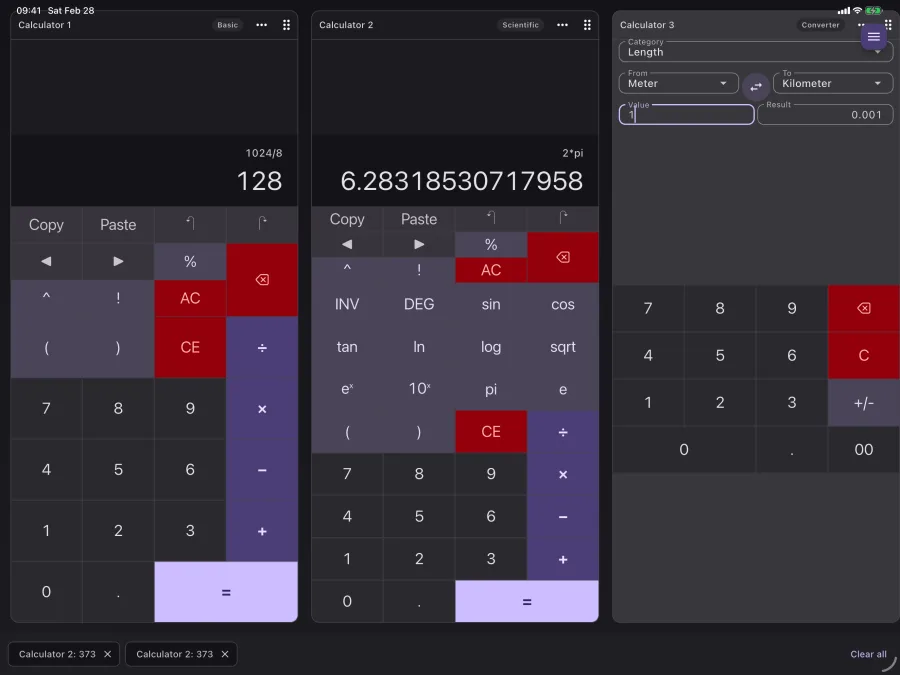
CalcBoard is the app-level answer. It splits itself: every panel is a complete, independent calculator, and the layout adapts to your screen.
A layout for every screen
- iPhone portrait: a focused active panel with fast tab switching between your open panels.
- iPhone landscape: panels arranged side by side — a literal split screen.
- iPad: 2–3 panel grid layouts with drag-to-reorder, plus full iPadOS Split View so CalcBoard can sit next to Safari, Numbers, or your homework PDF.
- Every panel remembers its state. Rotate, resize, or switch away — expressions and results survive.
Split screen, two different meanings
Worth separating, because the phrase covers two unrelated things. iPadOS Split View puts two apps side by side — calculator and browser, say — and is a system feature that works with any app. What this page describes is different: two or more calculators side by side inside one app, each with its own running value and history.
They compose rather than compete. On an iPad you can run CalcBoard in Split View next to a spreadsheet and still have several panels within CalcBoard itself. On an iPhone, where Split View does not exist, in-app panels are the only way to get two calculators on screen at once — which is precisely the gap this fills.
How many panels you actually get
Two panels are free; eight is the maximum with Premium. Two is the number that solves the common case — comparing one thing against another — and it is the free tier rather than a trial, so the core use of the app costs nothing and shows no ads. The jump to eight matters for a different kind of work: reconciling several figures at once, where each panel holds one line of a total you are building up.
Eight is a deliberate ceiling rather than a technical one. Past roughly four panels on an iPhone each becomes too narrow to read comfortably, so the useful maximum on a phone is lower than the allowed maximum; eight comes into its own on an iPad, where the width is there to use.
More than a visual split
A genuine split-screen calculator needs the two sides to talk. CalcBoard's Premium shared value tray carries results between panels (up to 50 stored values), and named variables like rate=7.25 work across every panel and mode. That's the difference between two calculators that happen to be adjacent and one workspace with multiple calculators in it.
Frequently Asked Questions
Does iPhone have a built-in split-screen calculator?
Can I use CalcBoard in iPad Split View?
How many panels can I open at once?
Split your calculator, not your attention
Free on iPhone and iPad. Two panels included — no ads, ever.
Download Free on App Store